The best kittens, technology, and video games blog in the world.

Wednesday, May 31, 2006

The will to fight God.

I've watched so much cool stuff in the last few days.
So let's start, in rough order of coolness.

  • Full Metal Panic Fumoffu (2003). Take Full Metal Panic, get rid of the plot, and replace it with overdone commedy. Plenty of stuff like battle teddy bears helping one yakuza gang beat another, weapons of mass destruction in a Japanese high school, and full scale battles to get a peek at girls at onsen. I think it's much better than the original series.
  • Amadeus (1984, #79 on imdb top list, 8 Oscars). Don't get fooled by the title, it is not a Mozart's biography ;-). Well, at least not any more than Ed Wood is a biography of Ed Wood. Actually I've seen the movie just after Ed Wood, and the similarities between Mozart and Ed were truly astounding. Anyway, the movie is about a Salieri, who at the same time is Mozart's greatest admirer and one that wants to murder him. Really awesome character development (F. Murray Abraham got a Best Actor in a Leading Role Oscar for the role of Salieri). Movies like that are one of the reasons why you should follow the imdb top list's advice.
  • Scrapped Princess (2003). I am the last dragon, who was hidden in a fold of space to aid you...when you gained the will to fight God. Really cool anime series about a girl that is destined to destroy the world. Loads of swordfights and explosions, cute girls with magical powers, stuff like that. And the plot is really cool. I haven't finished it yet, so I don't know how high should it be an the coolness scale.

Monday, May 29, 2006

Netherlands


I just got back from the Netherlands, visiting kim and the other guys there.

The answers to the most obvious questions, in order of the obviousness: yes, actually they do, no, no, yes, yes, yes, no, yes, plenty, yes, no, the latter, sometime soon I hope :-D

Of course you may have a different idea what's obvious and what's not, well especially the fourth question is kinda silly in my case. Oh, whatever :-D

PS. I would almost forgot about this one (probably due to the shock). The Dutch eat French fries with mayo. And it's usually plenty of mayo, some 5x more than the amount of ketchup people in other countries usually use. The funny thing - French fries with mayo are actually quite tasty.

Friday, May 26, 2006

Baby pandas are not very happy


So my application to Google Summer of Code got rejected. It wasn't quite unexpected, as there are 10x more candidates than available positions and it was totally silly to write only a single application (when the average seemed to be more like 5-10) after realizing the deadline is coming in just a few hours ^_^.

Anyway, some impressions:

  • Baby pandas still think that RbGame would be the best things to happen since Ruby on Rails.
  • Baby pandas are really curious what other projects got accepted instead. It has been quite a few days, and still the only information about them is list of titles. Baby pandas think all accepted application should be published in full. Anyway, some of the projects sound pretty cool, other less so, but it's hard to tell for sure simply looking at the title.
  • Baby pandas think taw is too lazy to code RbGame now, but they've been wrong about it a couple of times in the past. Oh well. :-)

jrpg level editor works

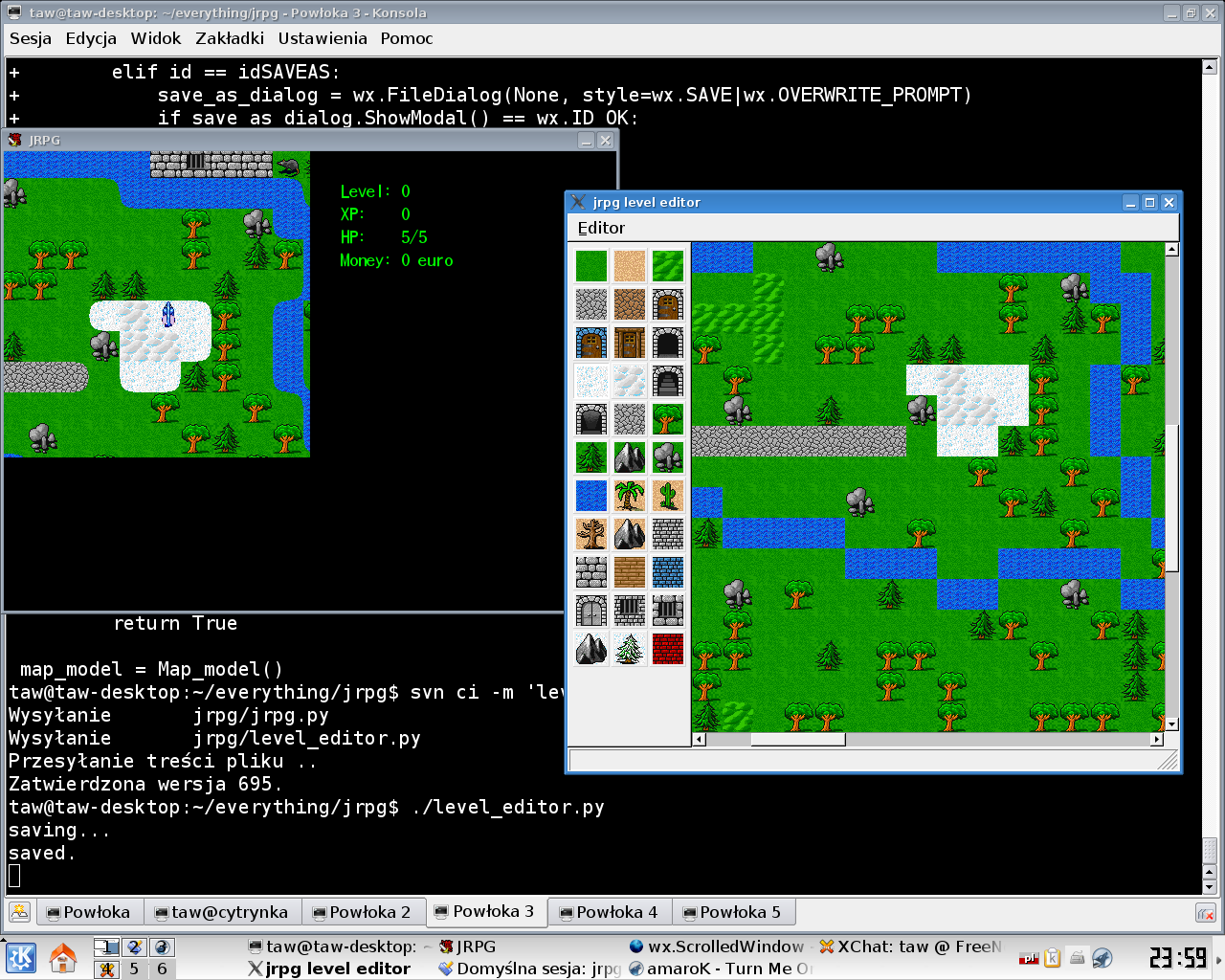
The level editor (on the right) is able to load, edit and save maps in the new format supported by jrpg (on the left), so now the world and the story can become much more interesting. The snowy patch visible on both screens has been added from the level editor. The tiles in the editors are still square, I'll port the tile-rounding code later. For now the editor is still only able to edit the tile data. All NPCs, enemies, quests, events, decorations, portals etc. have to be edited from the map_setup_<XXX> functions in jrpg.py So each map is described in 3 places:

  • As entry in World object's map_db hash table
  • In foo.map file
  • In map_setup_foo function
Here are some examples:

# In the world constructor:
self.map_db["angel sanctuary"] = {
  "tiles": self.load_map("angel_sanctuary.map"),
  "setup": lambda: self.map_setup_angel_sanctuary(),
}

# Setup method for the angel sanctuary:
  def map_setup_angel_sanctuary(self):
    def angel_quest():
      if mhc.quest_is_done("reward for level 3"):
        ui.change_text([U"I am guardian angel of software development.",
                        U"I'm impressed that you finished all quests in jrpg.",
                        U"Please send your savefile to its developer,",
                        U"and he is sure to add some new areas ^_^"])
      else:
        ui.change_text([U"I am guardian angel of software development.",
                        U"If you actually finish all quests in jrpg,",
                        U"send the savefile to its developer,",
                        U"and he is sure to add some new areas."])
  self.wormhole((3,0),"world",(35,36))
  self.add_chara("angel-blue",
                 route=[(3,2),(6,2),(7,3),(7,6),(6,7),(3,7),(2,6),(2,3)],
                 event=angel_quest)

# This is how angel_sanctuary.map file looks like:
BBB<BBBBBB
B........B
B........B
B........B
B........B
B........B
B........B
B........B
B........B
BBBBBBBBBB
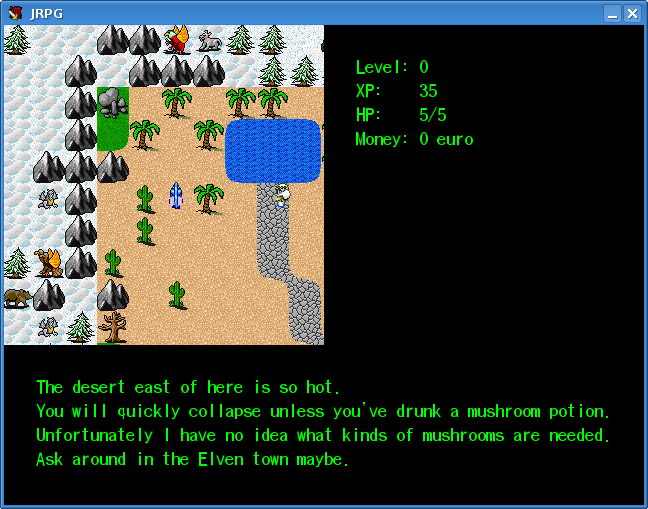
New jrpg code is slightly slower than the old one, but the different is not that big (at least on my hardware); it's also more or less debugged. The biggest problem and the reason I'm not releasing it yet is that the code assumed things will respawn every time they get out of the players' view. So you just had to walk around the mushroom forest and you'd find all requred mushrooms. In the new code they respawn only after you leave the map, so you'd have to return from the forest to the Elven town every time you want new mushrooms. That would be rather boring. I'll add some sort of respawn code or something and then release the improved jrpg on the jrpg website.

Thursday, May 25, 2006

Scrollable maps in jrpg

jrpg refactoring continues. The original world became scrollable, instead of jumping every screen. Of course as the original map was not supposed to be scrollable, it looks kinda silly.

Individual maps are loaded from foo.map files, so it can in principle work with the level editor.

The code still needs some work before it can be released.

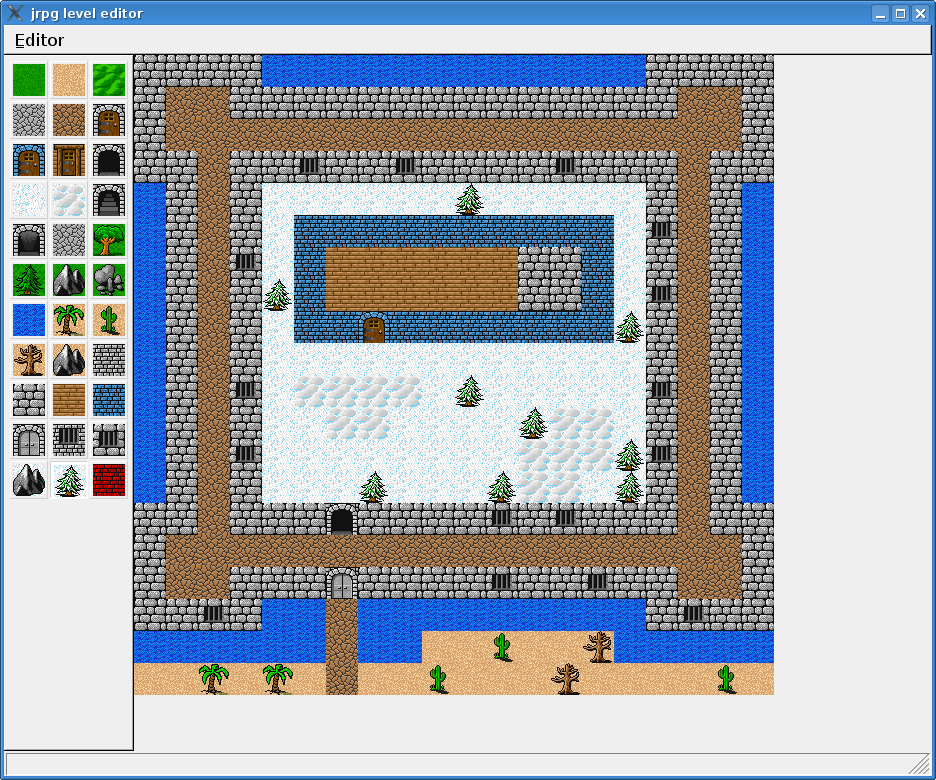
jrpg level editor

I've made an alpha level editor for jrpg. That's my first program that uses wxWidgets. They have been quite pleasant to work with, in spite of horrible C-isms (that is - trying to do emulate closures with function pointers, magic ids etc.) and CamelCase naming (FooBar methods, instead of foo_bar the way God meant men to program).

As you can see, there are no rounded tiles yet ;-)

I'll keep you posted if jrpg finally gets a new bigger world or other usability improvements.

Tuesday, May 23, 2006

Usability


Making jrpg "more usable" has long been on my todo list. Recently I've read some articles about usability. Especially useful was one of the articles, which listed many usability heuristics for games. Let's see how well does jrpg do:

  • Controls should be customizable and default to industry standard settings: No customizability, but they're standard enough.
  • Controls should be intuitive and mapped in a natural way: I thinks it's doing fine here.
  • Minimize control options: jrpg has very simple controls
  • The interface should be as non-intrusive as possible: Doing OK
  • For PC games, consider hiding the main computer interface during game play: This is true for PC games (like those played with mouse + keyboard). But as jrpg is not a PC game, but a pseudo-console retro, and played without a mouse, it doesn't really apply.
  • A player should always be able to identify their score/status in the game: The score/status is always there, but not the information about the current quest.
  • Follow the trends set by the gaming community to shorten the learning curve: jrpg is a retro game, it ignores the current trends by design. But it's not doing anything particularly bad here.
  • Interfaces should be consistent in control, color, typography, and dialog design: Close enough
  • Minimize the menu layers of an interface: done perfectly
  • Use sound to provide meaningful feedback: Not done at all. Adding a slayed a demon/got hit by a demon sounds would be like a nice option.
  • Do not expect the user to read a manual: Most people did fine without it, but some seem to have problems. Quick help screen is a step in the right direction. A training mode for teaching how to fight would also be nice. I guess the hiragana demons in the forest are a good place to add the help messages.
  • Provide means for error prevention and recovery through the use of warning messages: Not applicable
  • Players should be able to save games in different states: I'm not certain about that. Save games contain information not only about the game state, but also about game's knowledge about player's kanji skills. Save/load before bosses would make the game lose this knowledge. So I think it's impossible to do it without a major redesign.
  • Art should speak to its function: I don't really know what is meant by it.
  • Mechanics should feel natural and have correct weight and momentum: A lot of work in jrpg has been done to make the movement natural. You'd be surprised how non-trivial the issue turned out. And it seemed so trivial at first.
  • Feedback should be given immediately to display user control: Doing fine.
  • Get the player involved quickly and easily: This point could be improved a lot. It takes jrpg way too much time to learn about the player's kanji skills.
  • There should be a clear overriding goal of the game presented early: Like - learn all kanji ? Fine enough.
  • There should be variable difficulty level: jrpg autodetects player's skills and if it's possible to make the game easier or harder by fighting demons in different locations.
  • There should be multiple goals on each level: Like multiple treasure chests on each dungeon level ? I don't think it's really applicable.
  • A good game should be easy to learn and hard to master: So true.
  • The game should have an unexpected outcome: Not applicable.
  • Artificial intelligence should be reasonable yet unpredictable: Not applicable.
  • Game play should be balanced so that there is no definite way to win: Well, you could always simply learn all kanji ...
  • Play should be fair: jrpg is trying to be fair, by accepting different spellings, all correct pronunciations etc.
  • The game should give hints, but not too many: Not really applicable, unless you count the silly quests.
  • The game should give rewards: The crystal ball is a step in the right direction but it's way too mean.
  • Pace the game to apply pressure to, but not frustrate the player: Difficulty is automatically adjusted to the player's skills. But I think the difficulty in the dungeon is adjusted to an overly difficult level.
  • Provide an interesting and absorbing tutorial: The kana part kinda has such a function, but it's not doing too well.
  • Allow players to build content: Like, with a level editor ? I'd like to make one for myself, but it'd be rather hard architecturally.
  • Make the game replayable: Unless you learn 2000 kanji in one go, it's pretty much replayable.
  • Create a great storyline: It probably won't happen.
  • There must not be any single optimal winning strategy: Not applicable
  • Should use visual and audio effects to arouse interest: It's a retro game after all, and I don't have any artists to work for me ;-)
  • Include a lot of interactive props for the player to interact with: I'm not sure if it's applicable or not.
  • Teach skills early that you expect the players to use later: doing OK
  • Design for multiple paths through the game: It would be nice. I'll have to check it with the guardian angel of software development.
  • One reward of playing should be the acquisition of skill: That's kinda the point of jrpg.
  • Build as though the world is going on whether your character is there or not: That's way too ambitious for jrpg.
  • If the game cannot be modeless, it should feel modeless to the player: jrpg is not modeless, but tries to be close enough. Most keys work the same way in all modes, even silly ones (save game on quick help screen etc.).
So the useful ideas for UI improvements found in just a few minutes are:
  • Add input customizability
  • Display current quest
  • Add optional sounds to the battle
  • Add a quick help screen (done, visible on the screenshot)
  • Add a training mode for battle
  • A difficulty dispatcher.
  • Make the crystal ball less mean.
  • Take a look at difficulty.
  • Finally make a level editor.
  • Make the world bigger and more interesting.
It's quite surprising how many heuristics were applicable to jrpg, especially since they aren't specific to its genre.

Sunday, May 21, 2006

Firefox extensions


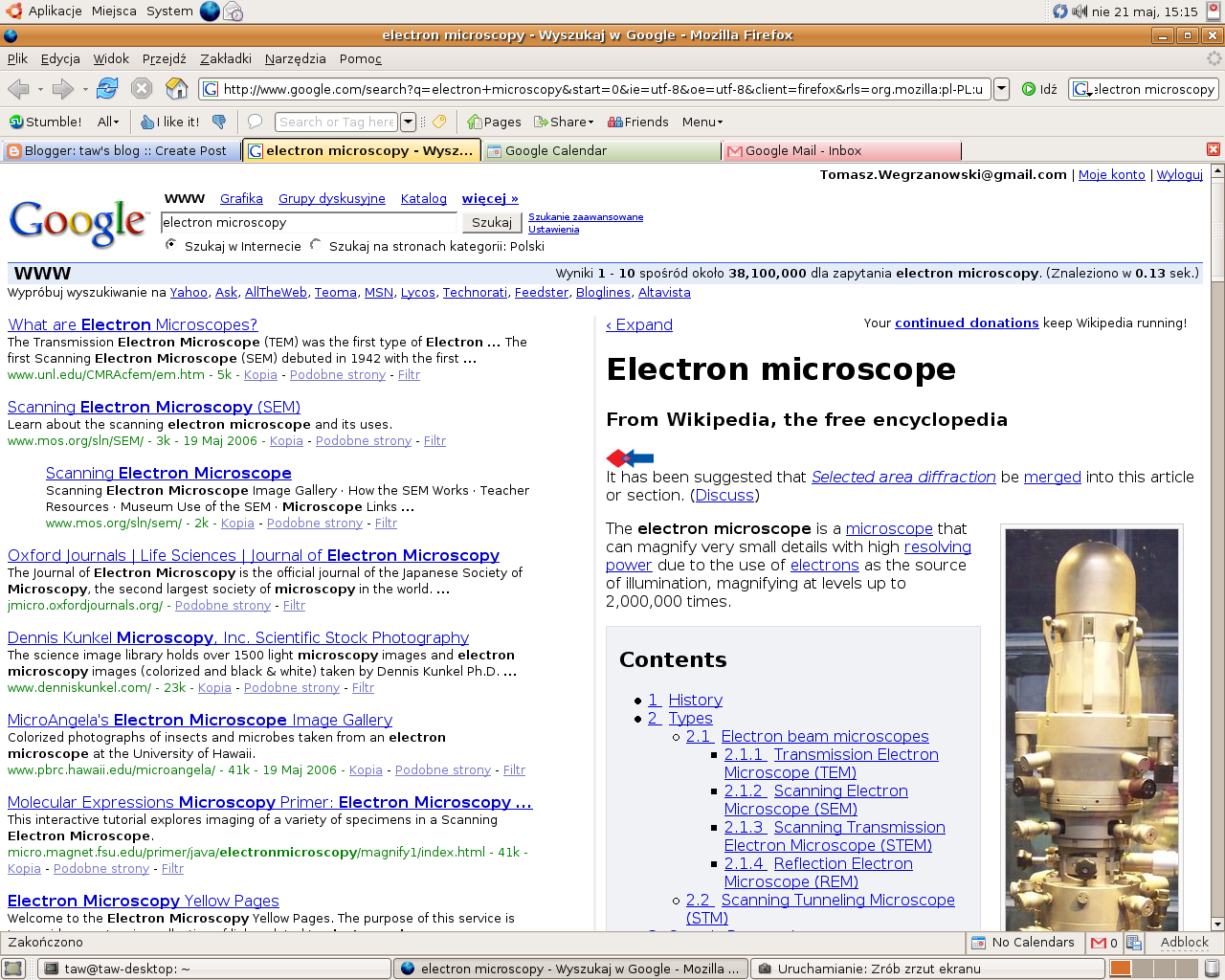
(The extensions visible on the screenshot are: Googlepedia, Customize Google, Gmail Notifier, Google Calendar Notifier, StumbleUpon, VideoDownloader, Colorful Tabs, and maybe some more if you look close enough)

The best browser


Out of the box, the best web browser ever is Opera. Firefox in default settings is slow, eats too much memory, and lacks half of Opera's functionality. Everything else (Konqueror, Safari, and that weird Microsoft thing that people sometimes confuse with a web browser) isn't even close.

That could kinda end this blog entry, but Opera lacks one small feature that Firefox has - the extensions. Firefox with enough extensions can be better than even Opera. Well, at least if you have enough RAM. So as I've just installed a new system, I had to configure Firefox. Here's an overview of the extensions I installed, I hope you'll find some of them useful too :-D

The big things


Before proceeding any further I had to fix the memory leak feature. Sorry, but I only have 256MB RAM and I sometimes use other programs besides Firefox. The fix is to go to about:config and change browser.sessionhistory.max_total_viewers from -1 to 0.

As I didn't remember names of everything I wanted , I went to Firefox website and browsed extensions in order of their popularity. The most important one is of course SessionSaver. With this great extension Firefox can finally do what Opera could do since forever, that is - stop forgetting which websites were open in case of a crash or closing the browser. I hope they integrate it with Firefox 2.

UI tweaks


Then, a few things that are small on their own, but together they really improve the web browsing experience.
  • Download Statusbar. The place for the progress bars and of the downloads and their context menus is not in a separate windows per download (the yuckiest thing ever) or in a separate window/tab. It's in the status bar. You won't know how great it is until you try it. It's my pick for "what should go into Firefox 2", just after they get SessionSaver integrated.
  • Adblock and Adblock Filterset.G Updater. There are too many ads on the Internet. Let's just block some.
  • Colorful Tabs. They tab handles are colored, so it's easier for the the human visual system to localize the right one when switching tabs.
  • Fission. A progress bar integrated with the address bar. It makes downloading slow websites slightly less annoying. I've heard they took it from Safari.
  • Restart Firefox. Firefox needs to be restarted when one changes any extensions. This one adds a Restart Firefox option to the File menu.
  • VideoDownloader. Can download embeded video files, like on YouTube or Google Video. It's not used very often, but it would be nice to have it integrated.

Website integration


In addition to the general extensions, I use some website-specific extensions.

  • CustomizeGoogle. Does all kinds of cool things to Google. Enable Google Suggest, disable ads (or leave them only on Froogle), add search links to Wikipedia, Yahoo, LiveJournal etc., use anonymous cookies, filter out spam from the results. It really improves your googling experience.
  • TinyUrl creator. Can create TinyUrls from right-click menu. Very useful.
  • Googlepedia. Display side by side Google results and Wikipedia article on a subject. They're synchronized, so clicking on links in Wikipedia part will update Google part. I haven't played much with it, but it looks cool. Check the screenshot above. It seems to work fine with CustomizeGoogle.
  • Gmail Notifier. It tells you when you have new mail on Gmail. Extremely convenient.
  • Google Calendar Notifier. Similar to Gmail Notifier.
  • rikaichan - for people who read Japanese websites, but sometime miss a word or two. Translates words and kanji on the spot. This is really a must-install extension if you learn Japanese. Not of much use otherwise.
  • StumbleUpon. Want to find cool websites ? Let yourself be clustered. It's the best thing that happened to web browsing since Firefox.
  • del.icio.us and del.icio.us Complete. Integrates with social bookmarking service del.icio.us. I've noticed that there were two such extensions on the list, and I don't know yet which one I want to use.

Other extensions


A few things that didn't fit in either category:
  • ChatZilla. A really nice IRC client. I don't think it beats irssi or xchat yet, but can be easily installed on virtually every machine.
  • View Source Chart. I haven't used it yet, I've just noticed it on the list. Makes a nice chart with website's DOM structure. Potentially useful for JavaScript debugging.
I hope you've found something for you on this list.

Or did I miss some cool extensions ? Go on and tell me about them :-D

PS. It's also a good idea to change dom.max_script_run_time from 5 to something like 30 in about:config, to avoid spurious script too slow warnings on Gmail and other Javascript-heavy websites.

Ubuntu instalation


I was really fed up with Gentoo, so I grabbed Ubuntu betas (Dapper Drake 6.06 Beta 2).

The first cool thing - installer is integrated with a LiveCD. That is - you boot into a LiveCD (like a Knoppix), with all the things (like FireFox) you'd expect from one, but also with an "Install" link on the desktop. That's the best installer ever - if you get bored looking at the progress bar you can read some web comics or something :-). I'm actually writing this blog entry from inside the installer, just clicking Save Draft a bit more often.

Live report from the instalation

  • Warning "there may be some bugs left, please backup everything". Yeah, as if anyone ever did.
  • Language selection.
  • Timezone selection from a world map. It has language-based defaults so it got Warsaw time seeing that the selected language is Polish.
  • Keyboard selection. Finally, everything is in Dvorak :-). There was something about keyboard layouts on the boot screen (Fsomething - Keyboard layouts), but as BIOS doesn't grok my USB keyboard I couldn't use it. The whole system (including FireFox) switched to the new layout.
  • Real name, username, password, computer name selection. Remember that Ubuntu has no root account by default, it uses sudo for root things.
  • Partition program. I selected the "by hand" option, as that's the part where magic can really screw someone up. The "by hand" option is a really cute partitioning wizard.
  • Instalation. Reading web comics was not such a bright idea after all. 256MB (with no swap at this point) is not enough for comfortable FireFox + installer.
  • Reboot.

After reboot

I'm going to spare you description of the hacks I had to do because of BIOS having problems with disks bigger than about 137GB, as it only took 5 minutes and wasn't Ubuntu-related or particularly interesting. Or does someone maybe know how to update BIOSes ?

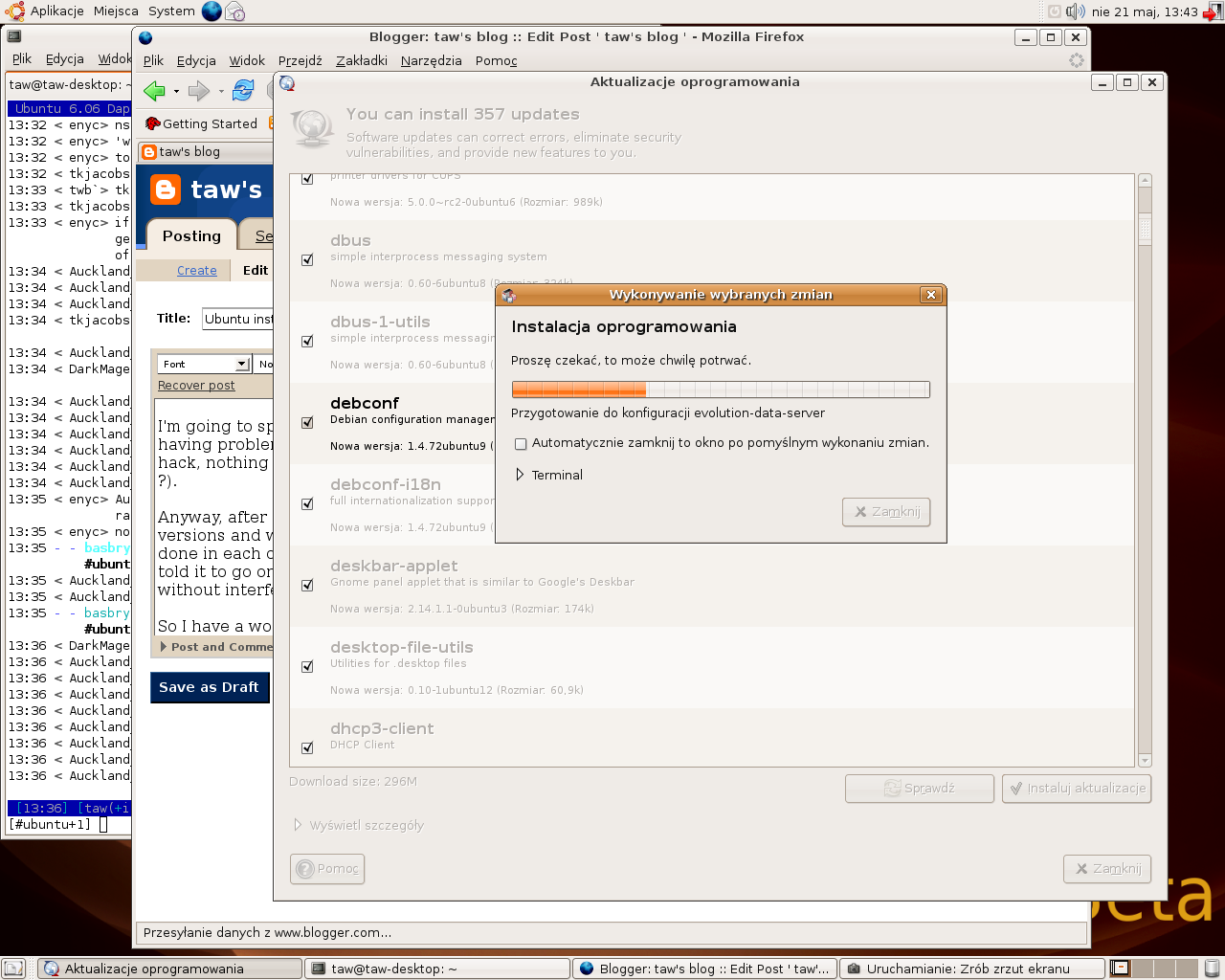
Anyway, after the reboot Ubuntu told me that 357 packages have updated versions and asked me whether I'd like to update. Information on what changed in each packag was available in a nice GUI wizard. So, I just told it to go on, and it updated 357 packages (it took about an hour, screenshot taken during the update).

So, I have a working system. Now the next actions are:
  • Install all necessary FireFox extensions. That's going to be some fine bloggable material.
  • Install more packages, like Eclipse and xchat and AmaroK. It should be much easier than in Gentoo, unless one of the programs has not been packaged for any Debian-based distro.
  • Install the proprietary 3D drivers. Yucky.
  • Configure everything that needs to be configured. Probably not too much work.
  • Decide whether GNOME (Ubuntu default) is better than KDE (what I used so far). If not, it's just a few clicks to switch it. The first impression is good - it doesn't seem to suck as much as it used to. Like, the terminal actually supports tabs. Another bloggable stuff coming :-D

Saturday, May 20, 2006

Predicting coolness


One of the coolest thing about the Internet is that it tries to predict what you're going to like. Nothing has tried that before. With newspapers or TV they tried to make you like certain things, usually products of those that paid for advertisements or the political views shared by the redactors. Don't even mention the "ratings" one could find in the newspapers, they were completely laughable.

But the Internet can be different.

First order prediction


What's the simplest way to predict whether you're going to like something or not ? Well, one could ask a lot of people what do they think about it, and simply guess that your opinion is going to fall somewhere in the middle.

That's what IMDB is doing. It is very good at suggesting what kind of movies are you going to like. Of course only if you have taste similar to the IMDB average. If not, you need to add a correction factor, like - well, I don't really like Spielberg, so I'm going to subtract 0.8 from each of his movies' score.

What if the system could do such corrections for you ?

Second order prediction


The next style of prediction, and the one that is considered the way nowadays, is predicting based on similarity of preferences. So you have to rate a few things first, then you get clustered with users that have similar preferences to yours, and the system estimates your further preferences based on theirs. Unless you're really unusual it's going to be better than the first order prediction. Or unless you provided too little data, but a well designed system should just fall back to the first order prediction in such case.

A very primitive version of second order prediction is something that the best p2p program ever (AudioGalaxy) had - the "if you like songs by A, you should also check B, C, and D". It worked perfectly. Most Internet bookstores seem to have a similar feature too, but it doesn't work that well. I guess music taste is simpler to predict than book taste.

A full-fledged second order prediction is present in StumbleUpon and last.fm.

StumbleUpon tries to find you some cool websites by clustering you with other users. It's a browser plugin (I use it with FireFox), so if you want a random website you click Stumble!, and then you can click a "I like it" or "I don't like it" button to get clustered better. Before you get any pages you have to select topics you're interested in, so it has something to start from. I think that's the best thing to happen to the web browsing since FireFox.

last.fm (and I think there are a few other projects like it) tries to predict your music preferences by clustering you with other users. It's integrated with a music player (I use it with AmaroK). Unfortunately it's not integrated with a P2P program, so it can't simply stream you new music and ask whether you like it, but it has some sort of personalized radio, a suggest feature, "neighbourhood" (people with similar taste) and other goodies.

There are probably many more than that. I predict you're going to like them. The prediction used first order method, because almost everybody does like them.

Third order prediction


Is clustering the last word or are we heading towards a new kind of coolness prediction ? Will IMDB add user clustering ? Will "smarter" methods like Bayesian networks find their use ? Will we be using mobile phones in grocery stores to cluster our food preferences ? How will it all affect anonymity and privacy ? In any case, I predict it's going to be the next big thing.